Reproject data#
Many of the functions in airbornegeo require coordiantes in meters. We can use the function reproject to convert from geographic coordinates (latitude/longitude) to projected coordinates (meters east/north), or between two different projected coordinates reference systems.
[1]:
# %load_ext autoreload
# %autoreload 2

import pandas as pd

import airbornegeo
[6]:
data_df = pd.read_csv("data/AGAP_magnetic_survey_processed_blocked.csv")
data_df = data_df[["longitude", "latitude", "mag_levelled", "line", "unixtime"]]
# for speed only retain every 10th point
data_df = data_df[::10]
data_df
[6]:
| longitude | latitude | mag_levelled | line | unixtime | |
|---|---|---|---|---|---|
| 0 | 75.636418 | -84.103650 | -23.435 | 1 | 1.229500e+09 |
| 10 | 75.652493 | -84.085177 | -47.680 | 1 | 1.229500e+09 |
| 20 | 75.666909 | -84.067042 | -60.240 | 1 | 1.229500e+09 |
| 30 | 75.682276 | -84.048692 | -67.800 | 1 | 1.229501e+09 |
| 40 | 75.693472 | -84.030138 | -74.030 | 1 | 1.229501e+09 |
| ... | ... | ... | ... | ... | ... |
| 352050 | 84.504656 | -80.005556 | 19.300 | 206 | 1.231249e+09 |
| 352060 | 84.399474 | -80.007076 | 28.450 | 206 | 1.231249e+09 |
| 352070 | 84.295793 | -80.008286 | 17.530 | 206 | 1.231249e+09 |
| 352080 | 84.190254 | -80.009647 | 1.710 | 206 | 1.231249e+09 |
| 352090 | 84.084743 | -80.010923 | -25.410 | 206 | 1.231249e+09 |
35210 rows × 5 columns
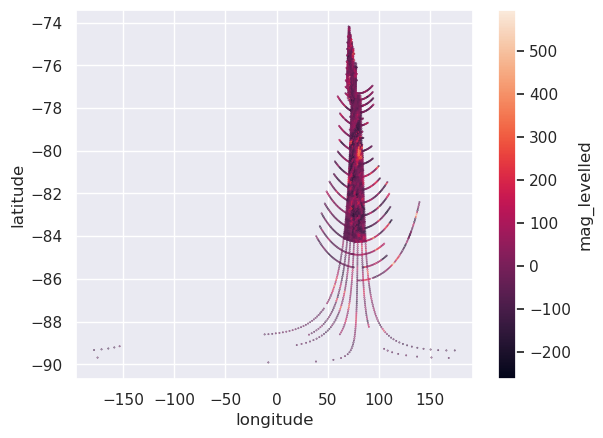
Plot the data in projected units#
[7]:
ax = data_df.plot.scatter(
    "longitude",
    "latitude",
    c="mag_levelled",
    s=0.1,
)
Reproject#
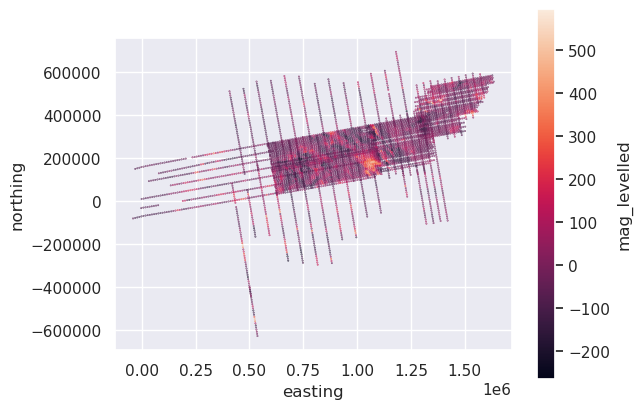
Since the original data is in lat / lon, the input CRS will be EPSG:4326, and we can reproject the data to EPSG 3031 - South Polar Stereographic, since the data is located in Antarctica.
[8]:
data_df["easting"], data_df["northing"] = airbornegeo.reproject(
    data_df.longitude,
    data_df.latitude,
    input_crs="EPSG:4326",
    output_crs="EPSG:3031",
)
data_df.head()
[8]:
| longitude | latitude | mag_levelled | line | unixtime | easting | northing | |
|---|---|---|---|---|---|---|---|
| 0 | 75.636418 | -84.103650 | -23.435 | 1 | 1.229500e+09 | 621152.853741 | 159064.167726 |
| 10 | 75.652493 | -84.085177 | -47.680 | 1 | 1.229500e+09 | 623146.956724 | 159388.532936 |
| 20 | 75.666909 | -84.067042 | -60.240 | 1 | 1.229500e+09 | 625101.022414 | 159720.791113 |
| 30 | 75.682276 | -84.048692 | -67.800 | 1 | 1.229501e+09 | 627080.676001 | 160047.462299 |
| 40 | 75.693472 | -84.030138 | -74.030 | 1 | 1.229501e+09 | 629070.437884 | 160424.376147 |
[9]:
ax = data_df.plot.scatter(
    "easting",
    "northing",
    c="mag_levelled",
    s=0.1,
)
ax.set_aspect("equal")